---
title: Lazy Loading Routes in React Router 6.4+
summary: Decoupling data-fetching from rendering introduces some complexities if you want to lazily load your route components. Check out how the newly introduced `route.lazy()` method helps solve this to keep your app bundles small and your UX snappy!
featured: false
date: 2023-03-10
image: /blog-images/headers/waterfall.jpg
imageAlt: A waterfall down a series of rocks shaped like a stairway
authors:
- Matt Brophy
---
[React Router 6.4][react-router-6.4] introduced the concept of a [_"Data Router"_][data-router] with the primary focus of separating data fetching from rendering to eliminate **render + fetch chains** and the spinners that come along with them.
These chains are more commonly referred to as "waterfalls", but we're trying to re-think that term because most folks hear waterfall and picture [Niagra Falls][niagra], where all of the water falls down in one big nice waterfall. But "all at once" seems like a great way to load data, so why the hate on waterfalls? Maybe we should chase 'em after all?
In reality, the "waterfalls" we want to avoid look more like the header image above and resemble a staircase. The water falls a little bit, then stops, then falls a bit more, then stops, and so on and so on. Now imagine each step in that staircase is a loading spinner. That's not the type of UI we want to give our users! So in this article (and hopefully beyond), we're using the term "chain" to indicate fetches that are inherently sequentially ordered, and each fetch is blocked by the fetch before it.
## Render + Fetch Chains
If you haven't yet read the [Remixing React Router][remixing-react-router] post or seen Ryan's [When to Fetch][when-to-fetch] talk from Reactathon last year, you may want to check them out before diving through the rest of this post. They cover a lot of the background behind **why** we introduced the idea of a Data Router.
The tl;dr; is that when your router is unaware of your data requirements, you end up with chained requests, and subsequent data needs are "discovered" as you render children components:
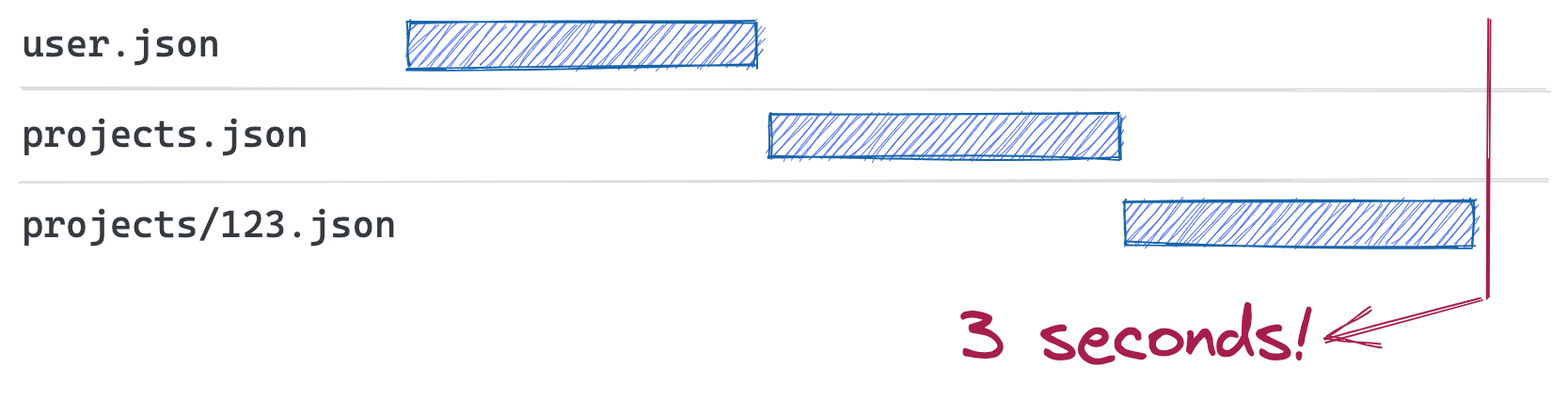 Coupling data fetching to components leads to render+fetch chains
But introducing a Data Router allows you to parallelize your fetches and render everything all at once:
Coupling data fetching to components leads to render+fetch chains
But introducing a Data Router allows you to parallelize your fetches and render everything all at once:
 Route fetching parallelizes requests, eliminating slow render+fetch chains
In order to accomplish this, a data router lifts your route definitions out of the render cycle so our router can identify nested data requirements ahead of time.
```jsx
// app.jsx
import Layout, { getUser } from `./layout`;
import Home from `./home`;
import Projects, { getProjects } from `./projects`;
import Project, { getProject } from `./project`;
const routes = [{
path: '/',
loader: () => getUser(),
element: ,
children: [{
index: true,
element: ,
}, {
path: 'projects',
loader: () => getProjects(),
element: ,
children: [{
path: ':projectId',
loader: ({ params }) => getProject(params.projectId),
element: ,
}],
}],
}]
```
But this comes with a downside. So far we've talked about how to optimize our data fetches, but we've also got to consider how to optimize our JS bundle fetches too! With this route definition above, while we can fetch all of our data in parallel, we've blocked the start of the data fetch by the download of a Javascript bundle containing _all_ of our loaders and components.
Consider a user entering your site on the `/` route:
Route fetching parallelizes requests, eliminating slow render+fetch chains
In order to accomplish this, a data router lifts your route definitions out of the render cycle so our router can identify nested data requirements ahead of time.
```jsx
// app.jsx
import Layout, { getUser } from `./layout`;
import Home from `./home`;
import Projects, { getProjects } from `./projects`;
import Project, { getProject } from `./project`;
const routes = [{
path: '/',
loader: () => getUser(),
element: ,
children: [{
index: true,
element: ,
}, {
path: 'projects',
loader: () => getProjects(),
element: ,
children: [{
path: ':projectId',
loader: ({ params }) => getProject(params.projectId),
element: ,
}],
}],
}]
```
But this comes with a downside. So far we've talked about how to optimize our data fetches, but we've also got to consider how to optimize our JS bundle fetches too! With this route definition above, while we can fetch all of our data in parallel, we've blocked the start of the data fetch by the download of a Javascript bundle containing _all_ of our loaders and components.
Consider a user entering your site on the `/` route:
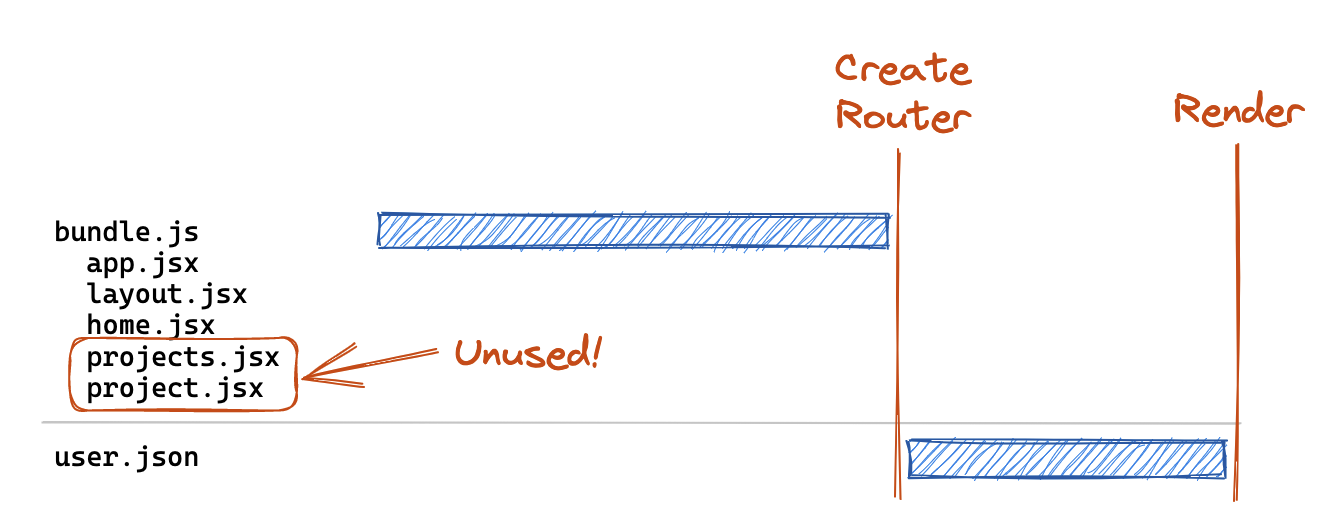 The singular JS bundle blocks the data fetch
This user still has to download the loaders and components for the `projects` and `:projectId` routes, even though they don't need them! And in the worst case, the user will _never_ need them if they don't navigate to those routes. This can't be ideal for our UX.
## React.lazy to the Rescue?
[React.lazy][react-lazy] offers a first-class primitive to chunk off portions of your component tree, but it suffers from the same tight-coupling of fetching and rendering that we are trying to eliminate with data routers 😕. This is because when you use `React.lazy()`, you create an async chunk for your component, but React won't actually _start_ fetching that chunk until it renders the lazy component.
```jsx
// app.jsx
const LazyComponent = React.lazy(() => import("./component"));
function App() {
return (
Loading lazy chunk...}>
);
}
```
The singular JS bundle blocks the data fetch
This user still has to download the loaders and components for the `projects` and `:projectId` routes, even though they don't need them! And in the worst case, the user will _never_ need them if they don't navigate to those routes. This can't be ideal for our UX.
## React.lazy to the Rescue?
[React.lazy][react-lazy] offers a first-class primitive to chunk off portions of your component tree, but it suffers from the same tight-coupling of fetching and rendering that we are trying to eliminate with data routers 😕. This is because when you use `React.lazy()`, you create an async chunk for your component, but React won't actually _start_ fetching that chunk until it renders the lazy component.
```jsx
// app.jsx
const LazyComponent = React.lazy(() => import("./component"));
function App() {
return (
Loading lazy chunk...}>
);
}
```
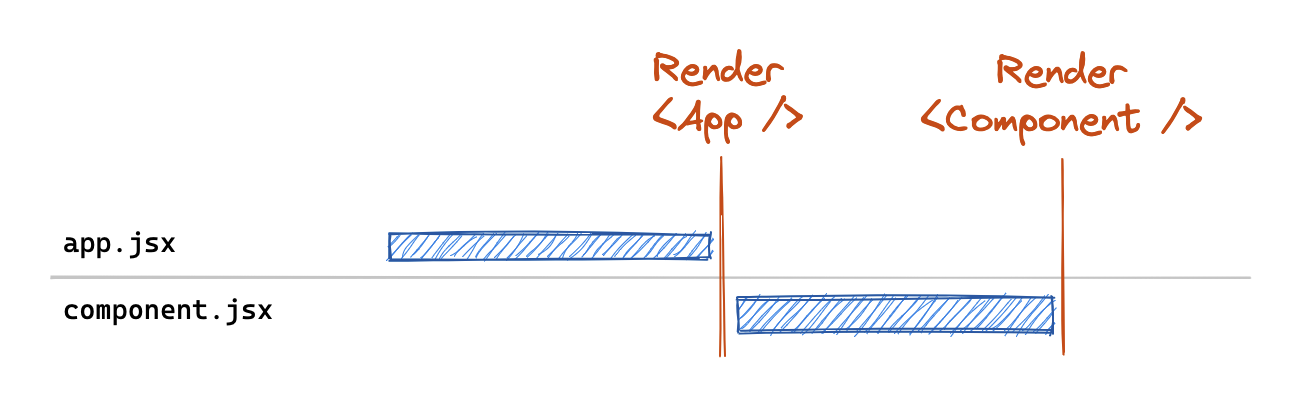 The React.lazy() call produces a similar render + fetch chain
So while we can leverage `React.lazy()` with data routers, we end up introducing a chain to download the component _after_ our data fetches. Ruben Casas [wrote up a great post][react-router-6.4-code-splitting] on some of the approaches to leverage code-splitting in data routers with `React.lazy()`. But as we can see from the post, code splitting was still a bit verbose and tedious to do manually. As a result of this sub-par DX, we received a [Proposal][proposal] (and an initial [POC implementation][poc]) from `@rossipedia`. This proposal did a great job of outlining the current challenges and got us thinking about the best way to introduce first-class code-splitting support in a `RouterProvider`. We'd like to give a **huge** shout out to both of these folks (and the rest of our amazing community) for being such active participants in the evolution of React Router 🙌.
## Introducing Route.lazy
If we want lazy-loading to play nicely with data routers, we need to be able to introduce laziness _outside_ of the render cycle. Just like we lifted data fetching out from the render cycle, we want to lift _route fetching_ out of the render cycle as well.
If you step back and look at a route definition, it can be split into 3 sections:
- Path matching fields such as `path`, `index`, and `children`
- Data loading/submitting fields such `loader` and `action`
- Rendering fields such as `element` and `errorElement`
The only thing a data router truly needs on the critical path is the path matching fields, as it needs to be able to identify all of the routes matched for a given URL. After matching, we already have an asynchronous navigation in progress so there's no reason we couldn't also be fetching route information during that navigation. And then we don't need the rendering aspects until we're done with data-fetching since we don't render the destination route until data fetches have completed. Yes, this can introduce the concept of a "chain" (load route, then load data) but it's an opt-in lever you can pull as needed to address the trade-off between initial load speed and subsequent navigation speeds.
Here's what this looks like using our route structure from above, and using the new `lazy()` method (available in React Router v6.9.0) on a route definition:
```jsx
// app.jsx
import Layout, { getUser } from `./layout`;
import Home from `./home`;
const routes = [{
path: '/',
loader: () => getUser(),
element: ,
children: [{
index: true,
element: ,
}, {
path: 'projects',
lazy: () => import("./projects"), // 💤 Lazy load!
children: [{
path: ':projectId',
lazy: () => import("./project"), // 💤 Lazy load!
}],
}],
}]
// projects.jsx
export function loader = () => { ... }; // formerly named getProjects
export function Component() { ... } // formerly named Projects
// project.jsx
export function loader = () => { ... }; // formerly named getProject
export function Component() { ... } // formerly named Project
```
_What's `export function Component` you ask? The properties exported from this lazy module are added to the route definition verbatim. Because it's odd to export an `element`, we've added support for defining `Component` on a route object instead of `element` (but don't worry `element` still works!)._
In this case we've opted to leave the layout and home routes in the primary bundle as that's the most common entry-point for our users. But we've moved the imports of our `projects` and `:projectId` routes into their own dynamic imports that won't be loaded unless we navigate to those routes.
The resulting network graph would look something like this on initial load:
The React.lazy() call produces a similar render + fetch chain
So while we can leverage `React.lazy()` with data routers, we end up introducing a chain to download the component _after_ our data fetches. Ruben Casas [wrote up a great post][react-router-6.4-code-splitting] on some of the approaches to leverage code-splitting in data routers with `React.lazy()`. But as we can see from the post, code splitting was still a bit verbose and tedious to do manually. As a result of this sub-par DX, we received a [Proposal][proposal] (and an initial [POC implementation][poc]) from `@rossipedia`. This proposal did a great job of outlining the current challenges and got us thinking about the best way to introduce first-class code-splitting support in a `RouterProvider`. We'd like to give a **huge** shout out to both of these folks (and the rest of our amazing community) for being such active participants in the evolution of React Router 🙌.
## Introducing Route.lazy
If we want lazy-loading to play nicely with data routers, we need to be able to introduce laziness _outside_ of the render cycle. Just like we lifted data fetching out from the render cycle, we want to lift _route fetching_ out of the render cycle as well.
If you step back and look at a route definition, it can be split into 3 sections:
- Path matching fields such as `path`, `index`, and `children`
- Data loading/submitting fields such `loader` and `action`
- Rendering fields such as `element` and `errorElement`
The only thing a data router truly needs on the critical path is the path matching fields, as it needs to be able to identify all of the routes matched for a given URL. After matching, we already have an asynchronous navigation in progress so there's no reason we couldn't also be fetching route information during that navigation. And then we don't need the rendering aspects until we're done with data-fetching since we don't render the destination route until data fetches have completed. Yes, this can introduce the concept of a "chain" (load route, then load data) but it's an opt-in lever you can pull as needed to address the trade-off between initial load speed and subsequent navigation speeds.
Here's what this looks like using our route structure from above, and using the new `lazy()` method (available in React Router v6.9.0) on a route definition:
```jsx
// app.jsx
import Layout, { getUser } from `./layout`;
import Home from `./home`;
const routes = [{
path: '/',
loader: () => getUser(),
element: ,
children: [{
index: true,
element: ,
}, {
path: 'projects',
lazy: () => import("./projects"), // 💤 Lazy load!
children: [{
path: ':projectId',
lazy: () => import("./project"), // 💤 Lazy load!
}],
}],
}]
// projects.jsx
export function loader = () => { ... }; // formerly named getProjects
export function Component() { ... } // formerly named Projects
// project.jsx
export function loader = () => { ... }; // formerly named getProject
export function Component() { ... } // formerly named Project
```
_What's `export function Component` you ask? The properties exported from this lazy module are added to the route definition verbatim. Because it's odd to export an `element`, we've added support for defining `Component` on a route object instead of `element` (but don't worry `element` still works!)._
In this case we've opted to leave the layout and home routes in the primary bundle as that's the most common entry-point for our users. But we've moved the imports of our `projects` and `:projectId` routes into their own dynamic imports that won't be loaded unless we navigate to those routes.
The resulting network graph would look something like this on initial load:
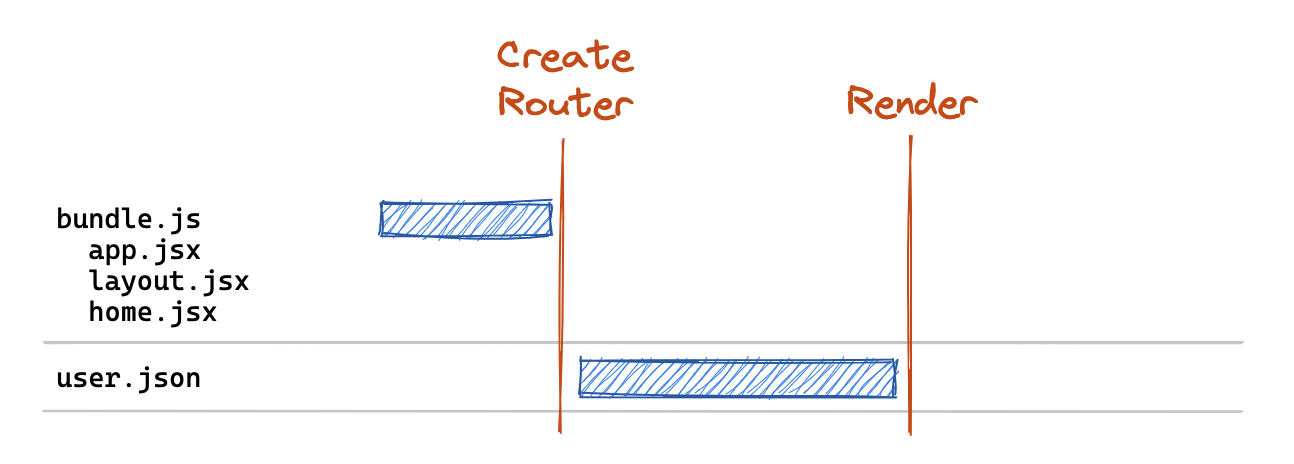 The lazy() method allows us to trim down our critical path bundle
Now our critical path bundle includes _only_ those routes we've deemed critical for initial entry to our site. Then when a user clicks a link to `/projects/123`, we fetch those routes in parallel via the `lazy()` method and execute their returned `loader` methods:
The lazy() method allows us to trim down our critical path bundle
Now our critical path bundle includes _only_ those routes we've deemed critical for initial entry to our site. Then when a user clicks a link to `/projects/123`, we fetch those routes in parallel via the `lazy()` method and execute their returned `loader` methods:
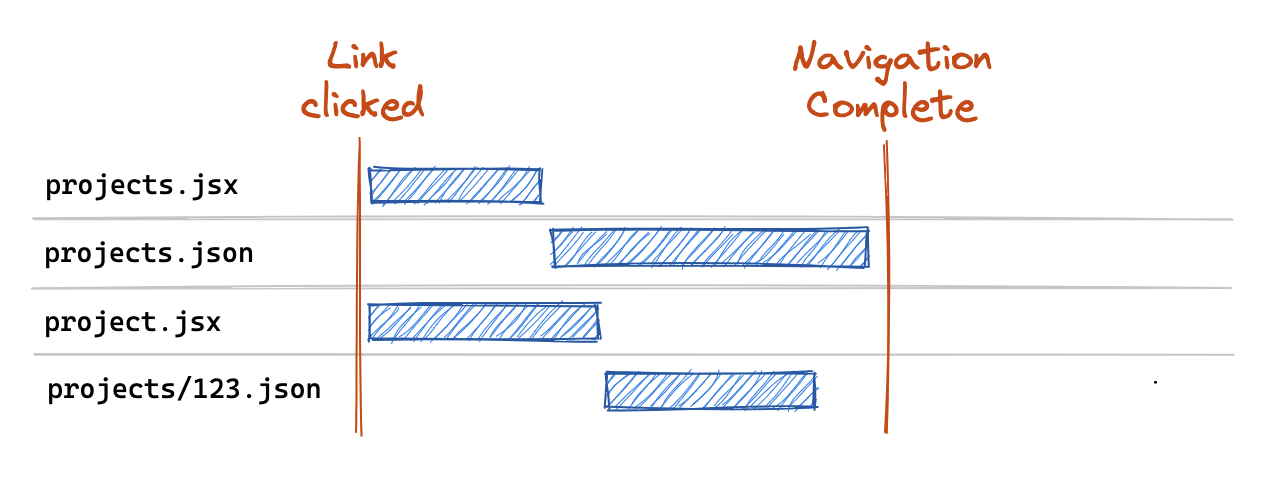 We lazy load routes in parallel on navigations
This gives us a bit of the best of both worlds in that we're able to trim our critical-path bundle to the relevant homepage routes. And then on navigations, we can match paths and fetch the new route definitions we need.
## Advanced Usage and Optimizations
Some of the astute readers may feel a bit of a 🕷️ spidey-sense tingling for some hidden chaining going on in here. Is this the _optimal_ network graph? As it turns out, it's not! But it's pretty good for the lack of code we had to write to get it 😉.
In this example above, our route modules include our `loader` as well as our `Component`, which means that we need to download the contents of _both_ before we can start our `loader` fetch. In practice, your React Router SPA loaders are generally pretty small and hitting external APIs where the majority of your business logic lives. Components on the other hand define your entire user interface, including all of the user-interactivity that goes along with it - and they can get quite big.
We lazy load routes in parallel on navigations
This gives us a bit of the best of both worlds in that we're able to trim our critical-path bundle to the relevant homepage routes. And then on navigations, we can match paths and fetch the new route definitions we need.
## Advanced Usage and Optimizations
Some of the astute readers may feel a bit of a 🕷️ spidey-sense tingling for some hidden chaining going on in here. Is this the _optimal_ network graph? As it turns out, it's not! But it's pretty good for the lack of code we had to write to get it 😉.
In this example above, our route modules include our `loader` as well as our `Component`, which means that we need to download the contents of _both_ before we can start our `loader` fetch. In practice, your React Router SPA loaders are generally pretty small and hitting external APIs where the majority of your business logic lives. Components on the other hand define your entire user interface, including all of the user-interactivity that goes along with it - and they can get quite big.
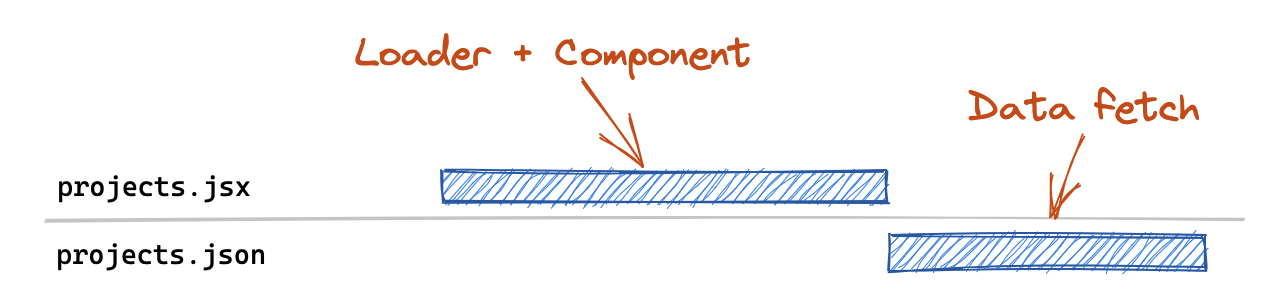 Singular route files block the data fetch behind the component download
It seems silly to block the `loader` (which is likely making a `fetch()` call to some API) by the JS download for a large `Component` tree? What if we could turn this 👆 into this 👇?
Singular route files block the data fetch behind the component download
It seems silly to block the `loader` (which is likely making a `fetch()` call to some API) by the JS download for a large `Component` tree? What if we could turn this 👆 into this 👇?
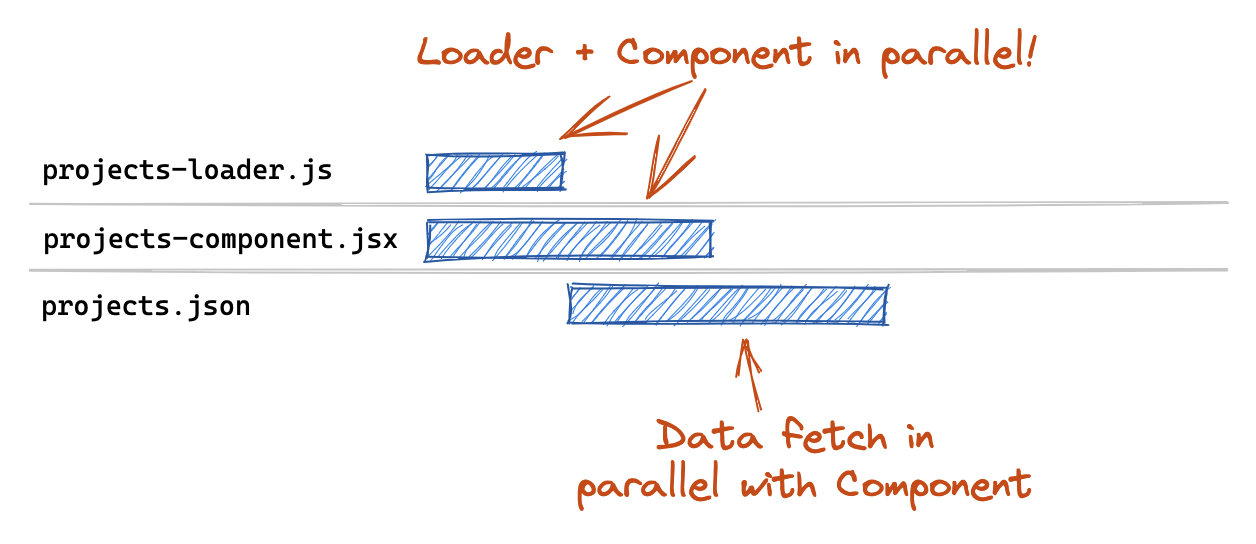 We can unblock the data fetch by extracting the component to it's own file
The good news is that you can with minimal code changes! If a `loader`/`action` is statically defined on a route, then it will be executed in parallel with `lazy()`. This allows us to decouple the loader data fetch from the component chunk download by separating the loader and component into separate files:
```js
const routes = [
{
path: "projects",
async loader({ request, params }) {
let { loader } = await import("./projects-loader");
return loader({ request, params });
},
lazy: () => import("./projects-component"),
},
];
```
Any fields defined statically on the route will always take precedence over anything returned from lazy. So while you should not be defining a static `loader` _and also_ returning a `loader` from `lazy`, the lazy version will be ignored and you'll get a console warning if you do.
This statically-defined loader concept also opens up some interesting possibilities for inlining code directly. For example, maybe you have a single API endpoint that knows how to fetch data for a given route based on the request URL. You could inline all of your loaders at minimal bundle cost and achieve total parallelization between your data fetch and your component (or route module) chunk download.
```js
const routes = [
{
path: "projects",
loader: ({ request }) => fetchDataForUrl(request.url),
lazy: () => import("./projects-component"),
},
];
```
We can unblock the data fetch by extracting the component to it's own file
The good news is that you can with minimal code changes! If a `loader`/`action` is statically defined on a route, then it will be executed in parallel with `lazy()`. This allows us to decouple the loader data fetch from the component chunk download by separating the loader and component into separate files:
```js
const routes = [
{
path: "projects",
async loader({ request, params }) {
let { loader } = await import("./projects-loader");
return loader({ request, params });
},
lazy: () => import("./projects-component"),
},
];
```
Any fields defined statically on the route will always take precedence over anything returned from lazy. So while you should not be defining a static `loader` _and also_ returning a `loader` from `lazy`, the lazy version will be ignored and you'll get a console warning if you do.
This statically-defined loader concept also opens up some interesting possibilities for inlining code directly. For example, maybe you have a single API endpoint that knows how to fetch data for a given route based on the request URL. You could inline all of your loaders at minimal bundle cost and achieve total parallelization between your data fetch and your component (or route module) chunk download.
```js
const routes = [
{
path: "projects",
loader: ({ request }) => fetchDataForUrl(request.url),
lazy: () => import("./projects-component"),
},
];
```
 Look ma, no loader chunk!
As a matter of fact, this is exactly how Remix approaches this issue because route loaders are their own API endpoints 🔥.
## More Information
For more information, check out the [decision doc][decision-doc] or the [example][example] in the GitHub repository. Happy Lazy Loading!
[data-router]: https://reactrouter.com/en/main/routers/picking-a-router
[niagra]: https://en.wikipedia.org/wiki/Niagara_Falls
[react-router-6.4]: https://remix.run/blog/react-router-v6.4
[remixing-react-router]: https://remix.run/blog/remixing-react-router
[when-to-fetch]: https://www.youtube.com/watch?v=95B8mnhzoCM
[react-lazy]: https://beta.reactjs.org/reference/react/lazy
[react-router-6.4-code-splitting]: https://www.infoxicator.com/en/react-router-6-4-code-splitting
[proposal]: https://github.com/remix-run/react-router/discussions/9826
[poc]: https://github.com/remix-run/react-router/pull/9830
[decision-doc]: https://github.com/remix-run/react-router/blob/main/decisions/0002-lazy-route-modules.md
[example]: https://github.com/remix-run/react-router/tree/main/examples/lazy-loading-router-provider
Look ma, no loader chunk!
As a matter of fact, this is exactly how Remix approaches this issue because route loaders are their own API endpoints 🔥.
## More Information
For more information, check out the [decision doc][decision-doc] or the [example][example] in the GitHub repository. Happy Lazy Loading!
[data-router]: https://reactrouter.com/en/main/routers/picking-a-router
[niagra]: https://en.wikipedia.org/wiki/Niagara_Falls
[react-router-6.4]: https://remix.run/blog/react-router-v6.4
[remixing-react-router]: https://remix.run/blog/remixing-react-router
[when-to-fetch]: https://www.youtube.com/watch?v=95B8mnhzoCM
[react-lazy]: https://beta.reactjs.org/reference/react/lazy
[react-router-6.4-code-splitting]: https://www.infoxicator.com/en/react-router-6-4-code-splitting
[proposal]: https://github.com/remix-run/react-router/discussions/9826
[poc]: https://github.com/remix-run/react-router/pull/9830
[decision-doc]: https://github.com/remix-run/react-router/blob/main/decisions/0002-lazy-route-modules.md
[example]: https://github.com/remix-run/react-router/tree/main/examples/lazy-loading-router-provider